 Watchie
For companies with remote teams
Remote work you can actually see.
Watchie is the time clock for remote teams. It tells real work from mouse jigglers and second jobs, keeps breaks honest, and turns approved hours into payroll — fairly, and in plain sight of your team.
Already a customer? Log in to your dashboard →
- Mac & Windows app
- Employees & contractors
- Gusto, QuickBooks, ADP, Paychex
- MLMaria L.Customer service92%
- DKDaniel K.On lunch · 0:24Break
- JEJordan E.Mouse jiggler pattern · other Slack▼ 14%
- ARAna R.Scheduling81%
Sound familiar?
Remote teams save money and widen your hiring — until you can’t tell who’s working.
Green status, empty chair
A $20 mouse jiggler keeps someone “active” for hours.
Two jobs, one paycheck from you
Someone is answering another company’s Slack on your time.
The 90-minute lunch
Breaks that stretch, and no one notices until the work slips.
Timesheets on the honor system
Hours typed in at the end of the week, from memory.
Payroll by hand
Re-typing hours, guessing overtime, missing California’s daily rules.
Contractors treated like staff
Schedules and scoring for a 1099 can turn them into an employee.
Everything you need to manage a remote team.
Time clock, activity, screenshots, second-job signals, payroll and compliance — in one app your team can actually understand.
Time clock & breaks
Clock in with one click. Bathroom, lunch and personal breaks, with a daily limit and flags when it’s exceeded.
Learn more →Activity tracking
Clicks, keystroke counts and real mouse movement in 10-minute blocks. Jigglers and auto-clickers stand out.
Learn more →Screenshots
Every connected monitor, at random moments, 0–3 per 10 minutes. Optional blur. A notice each time.
Learn more →Second-job detection
Another company’s Slack or email, remote-desktop and virtual-machine software, double-booked meetings.
Learn more →Payroll-ready hours
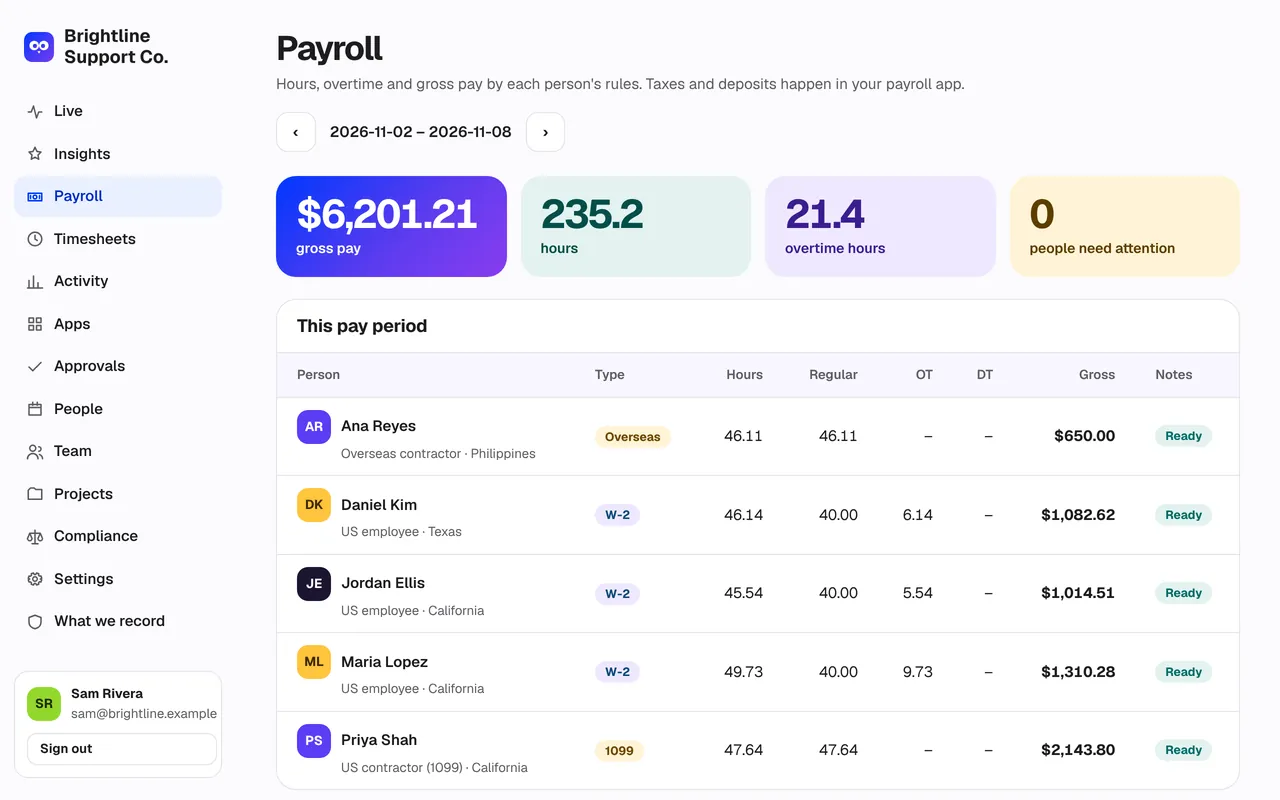
Overtime by state, unpaid lunches, pay rates. Files for Gusto, QuickBooks, ADP and Paychex.
Learn more →Compliance guardrails
Rules for 50 states, DC and 24 countries. Contractor protections. Big warnings before any rule is turned off.
Learn more →Insights
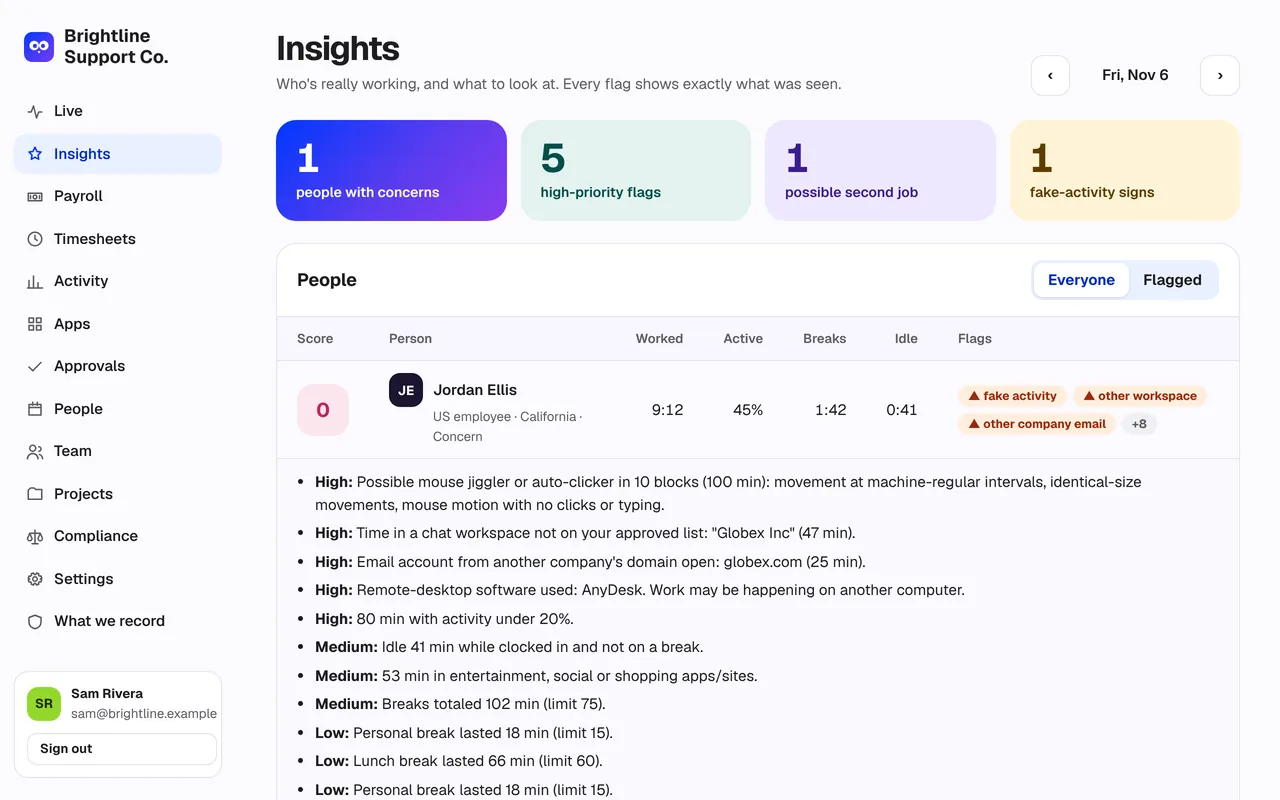
Every flag says exactly what was seen.
No black-box “productivity scores.” Each day gets a score from 0 to 100 with the reasons spelled out — so you can have a fair, specific conversation.
- Possible mouse jiggler in 10 blocks — identical movements, no clicks or typing
- Time in another company’s Slack workspace, by name
- Remote-desktop software in use
- Breaks over the daily limit; idle time that wasn’t a break
Up and running in an afternoon.
- 1
Create your team
Sign up, add projects, and set your break limit, screenshots and pay period.
- 2
Invite people
Send an invite link. Each person sees exactly what Watchie records and accepts the notice.
- 3
They clock in
They install the Mac or Windows app and press Clock in. That’s it.
- 4
You review and pay
Check Insights, approve the week, and export hours to payroll.
Fair by design
Monitoring people understand holds up.
Watchie is transparent by default. That protects your team’s trust — and protects you in an HR complaint or a wage claim.
What it records
- Hours, breaks and projects
- Activity counts — never content
- Apps and window titles
- Random screenshots, with a notice
What it never records
- What anyone types
- Passwords or clipboard
- Camera, mic or location
- Anything off the clock or on a break
Payroll
From approved hours to payroll in one click.
Overtime by state, unpaid lunches, California meal-break premiums and pay rates — then a file your payroll provider imports.
Product names are trademarks of their owners. Watchie is not affiliated with or endorsed by them.
Frequently asked questions
Does Watchie record what people type?
No. Watchie counts keyboard and mouse activity — for example, how many keystrokes in 10 minutes — but never records which keys were pressed or what was typed. It never records passwords, the clipboard, the camera, the microphone or location.
Can Watchie tell if someone has a second job?
Watchie surfaces signals: time in another company’s Slack or Teams workspace, email accounts from other companies’ domains, remote-desktop and virtual-machine software, overlapping meetings, and long stretches with no activity. These are signals for a conversation, not proof on their own.
Is employee monitoring legal?
In the US, monitoring company work on company time is generally allowed with notice, and some states — including New York, Connecticut and Delaware — require written notice. Watchie shows every person a plain-language notice before tracking starts and records their acknowledgment. Rules differ by state and country, so check with your employment lawyer.
Does it work for contractors and overseas workers?
Yes. Contractors in the US and overseas are tracked for billing. Schedules, break limits and productivity scores are off for contractors by default, because controlling how and when a contractor works can make them an employee under the law.
Which payroll providers does it work with?
Watchie exports files for Gusto, QuickBooks, ADP and Paychex, plus a contractor payments file, and connects directly to Gusto and QuickBooks.
What computers does it run on?
The desktop app runs on Mac (macOS 11 or later) and Windows (10 or later). The dashboard works in any browser, including on a phone.
See who’s really working.
Set up your team in minutes. Download the app for Mac or Windows and clock in.
Already have an account? Log in